
DesktopApp for Windows
Further information on installation can be found here
The new Version 2.5.2 of 25.02.2026
In the new version, frequently requested customer features have been implemented, and various minor improvements have been made. In addition, the SIA 181 standard from Switzerland has been integrated as a new regulatory framework.
The product database has also been updated again. Further information about the database updates can be found here.
The following new features are included in Version 2.5.2:
Average values for reverberation time and A/V
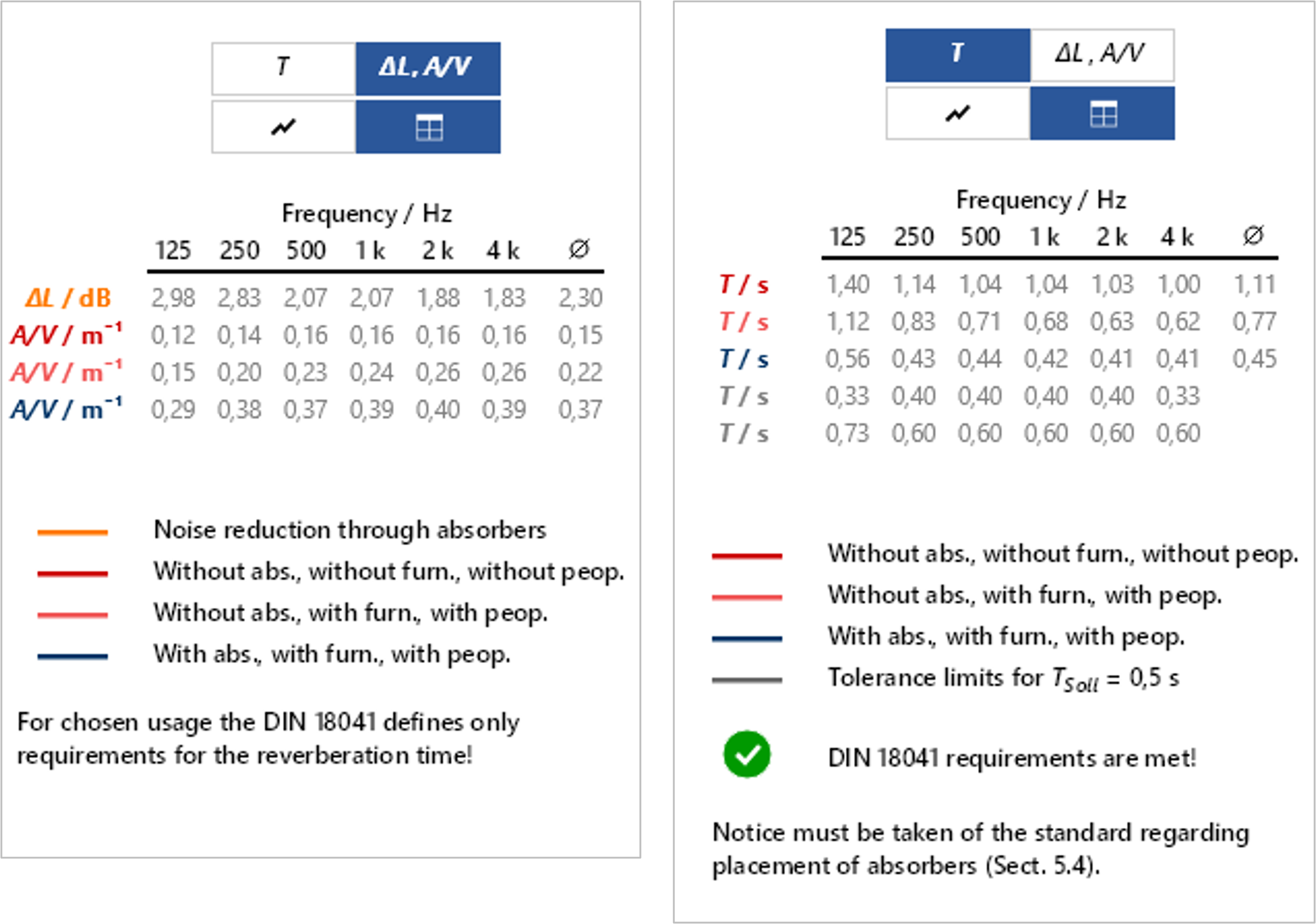
Average values for reverberation time and A/V ratios across all octave bands are now calculated for the different planning conditions.
These values are displayed within the software and are also included in the Word export.
Integrated calculator
The quantity input field now includes an integrated calculator. Required values (e.g. areas) can be calculated quickly and conveniently and transferred directly into the input fields. External calculations and manual transfer are no longer necessary.
Consideration of sound level reduction in the auralization
It is now optionally possible to take into account the sound level reduction resulting from the additional use of absorbers in the auralization.
Weighted sound absorption coefficient
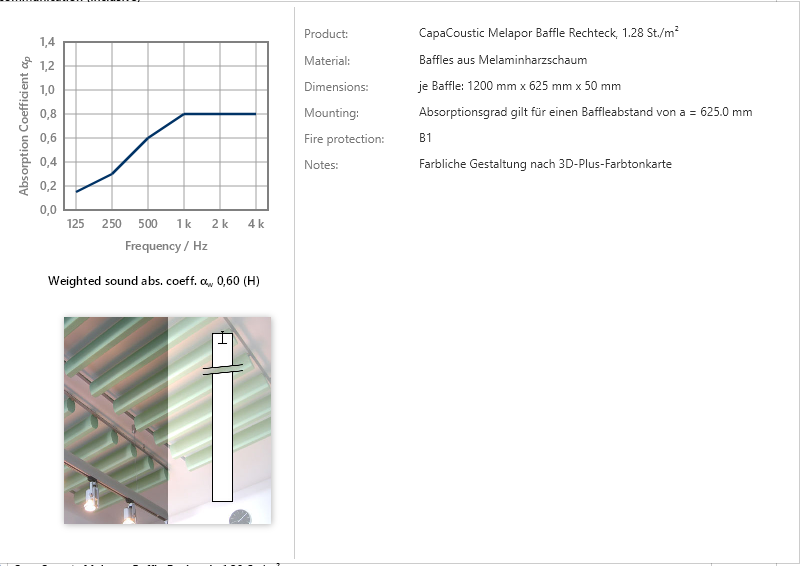
For each absorber element, the weighted sound absorption coefficient αw is now calculated and displayed.
This information is available both in the user interface and in the Word export.
New standard: SIA 181
In Switzerland, room acoustic requirements for classrooms and sports halls are defined in SIA 181:2006.
In 2020, a revised version of SIA 181 was published. The previously combined fields of building acoustics and room acoustics were separated. Building acoustics remain part of SIA 181:2020, while room acoustics have been transferred to SIA 181/1, which is currently still in draft status.
For this reason, the room acoustic requirements of SIA 181:2006 have initially been implemented in the software.
Installation information for version 2.5.2
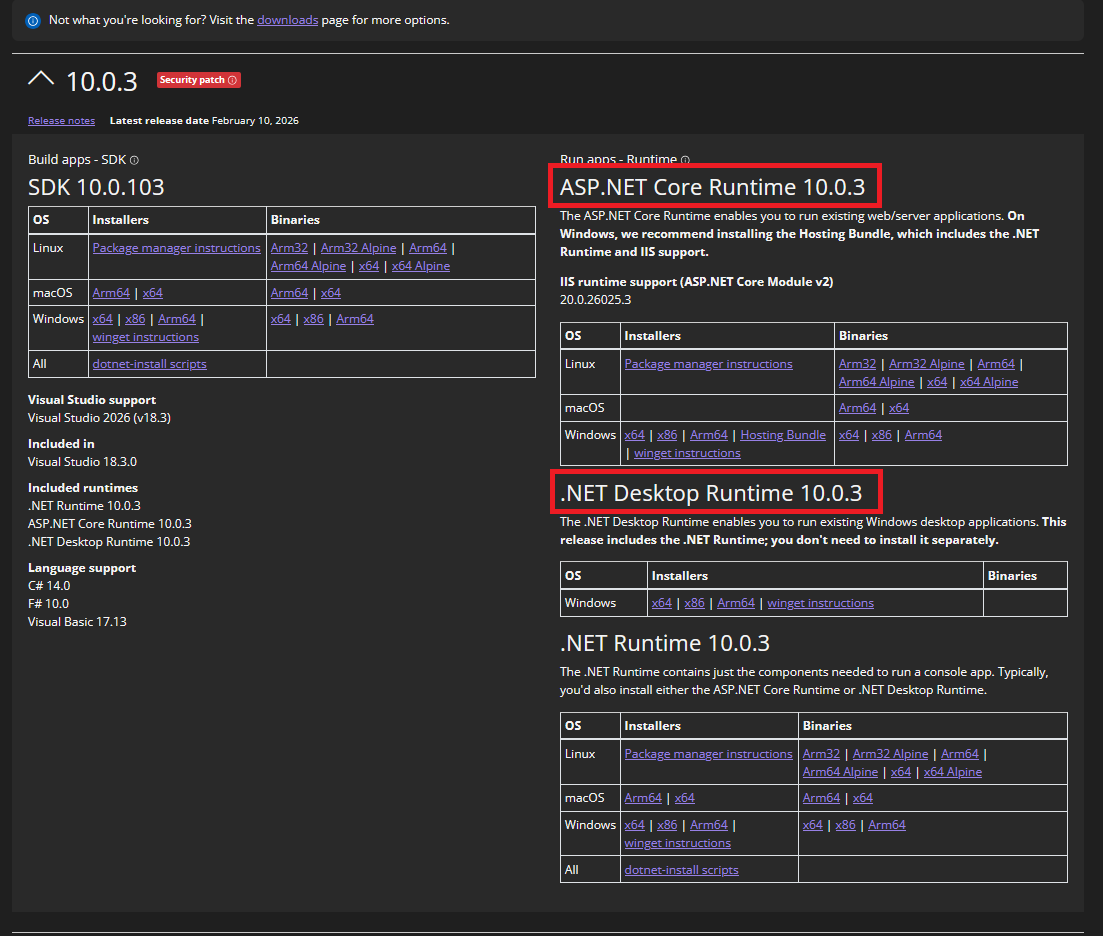
As part of the update, it will be necessary to download new .NET runtime environment packages (10.0). There are two, but their names are so similar that the difference is often overlooked. These two packages are normally obtained automatically during the installation, otherwise you will find them hier. They are marked in the following screenshot:
The version 2.5.1 from February 3, 2025
In addition to new functions, product data from new manufacturers has also been added in the new version. Further information on the database updates can be found here. You now have a total of over 4000 product variants at your disposal.
Version 2.5.1 brings the following new functions:
Improvement and expansion of the import of measurement
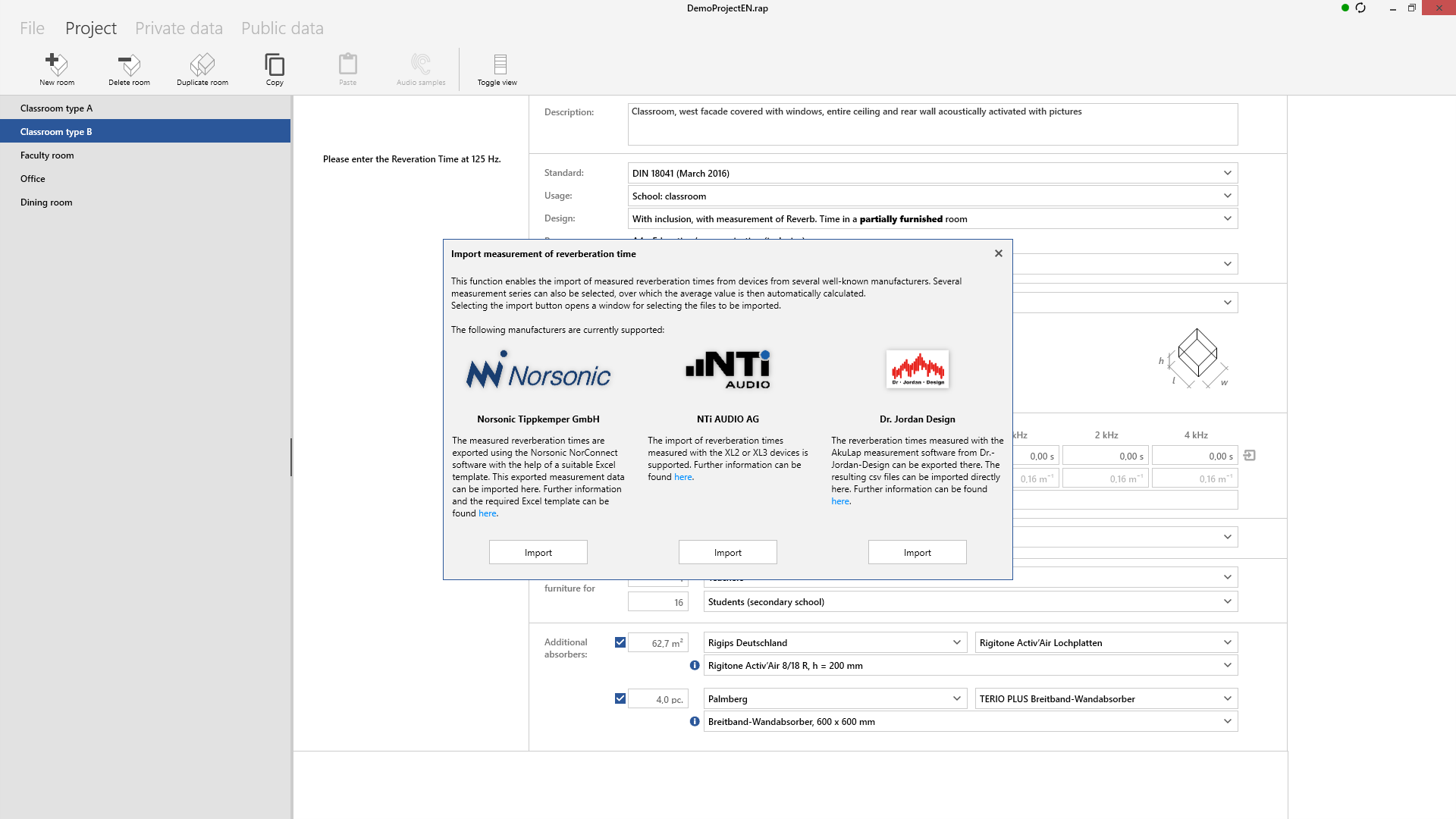
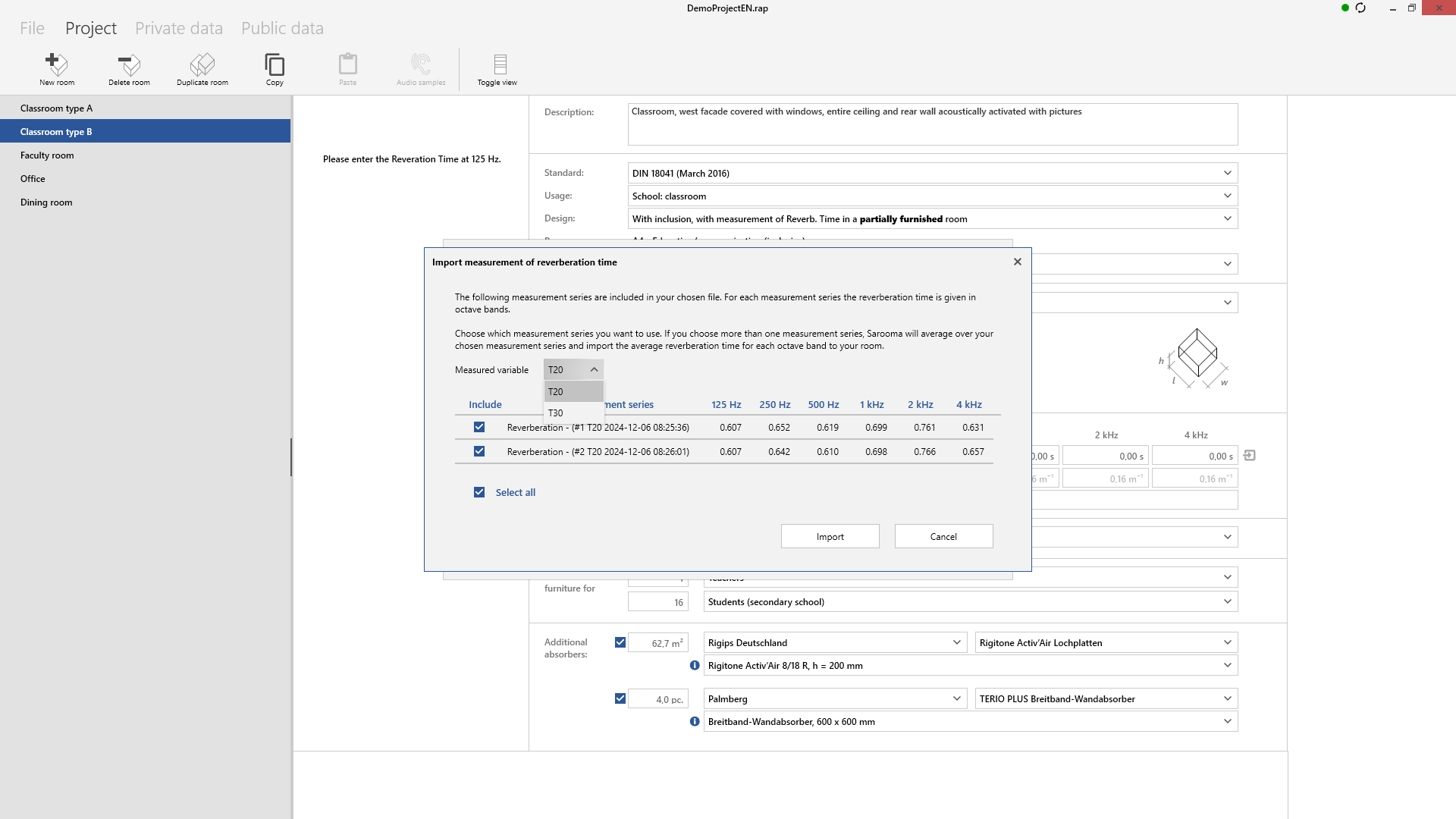
It is now possible to import measurement data for planning based on measured reverberation times. This was already possible for devices from the manufacturers Norsonic Tippkemper GmbH and NTi Audio AG. Their import has been adapted to new devices and software, so the XL3 from NTi Audio is now also supported.
Version 2.5.1 now also supports the import of measurement data measured with AkuLap from Dr.-Jordan-Design. Furthermore, it is now possible to select whether T20 or T30 should be imported during import, provided that both quantities are included in the exports.
Next to the fields for entering the measured data is an icon for importing them. Click on the icon to open a window for selecting the desired device manufacturer as well as further information on the respective supported measuring devices and the import process.
Copying and pasting rooms
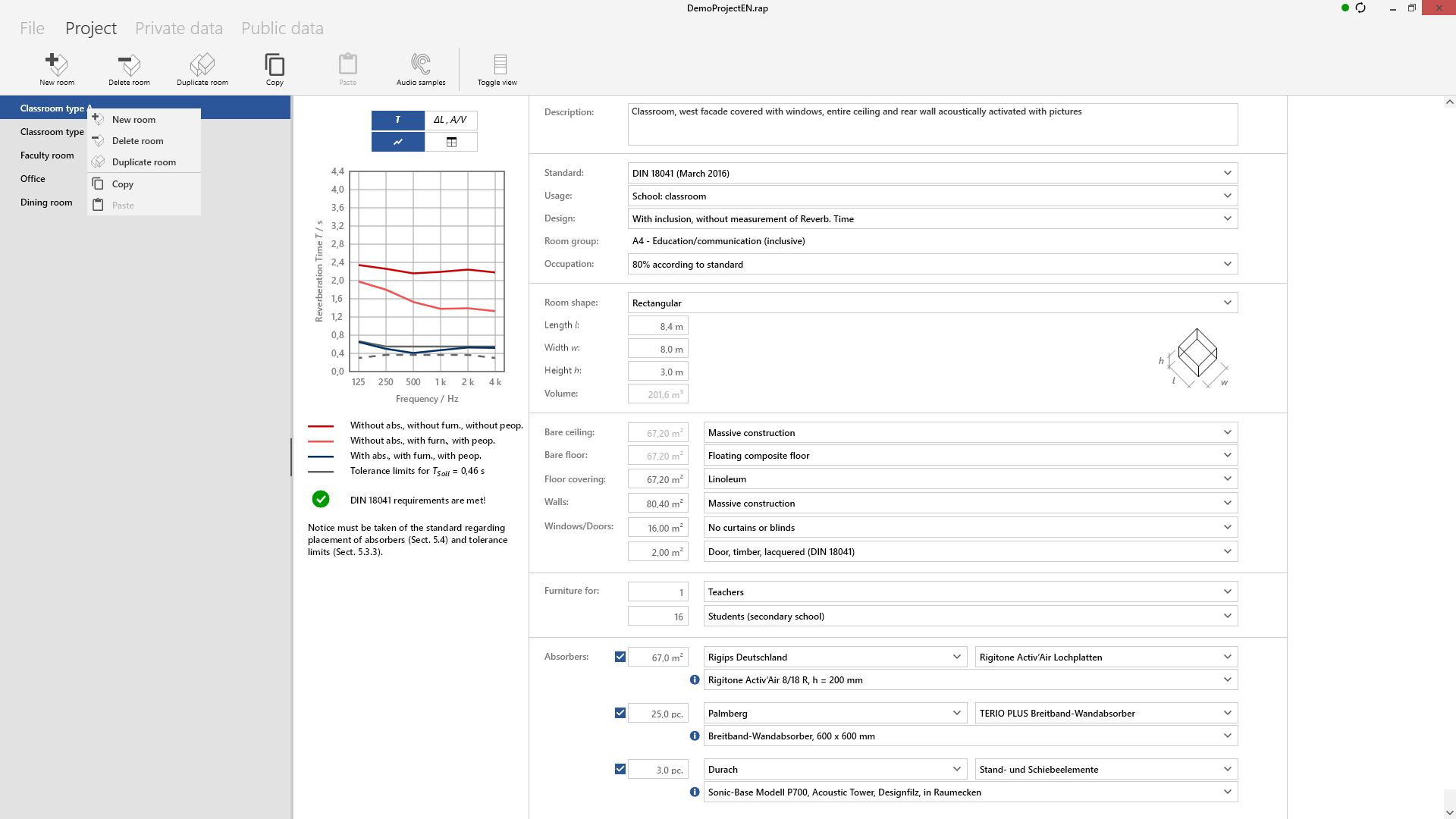
This new function allows you to easily copy and paste created rooms. In addition to the duplicate function, which duplicates rooms within a project directly with a mouse click, the copy function offers the option of copying rooms and pasting them back into another project.
The new version 2.5 from 18.09.2024 brings new functions
Directive CSN 73 0527 from the Czech Republic from August 2023 has been added to the new version of the desktop app.
The database has also been updated.
Products from two new manufacturers have been added and many data sets from existing manufacturers have been updated and supplemented with additional absorbers.
Further information on the database updates can be found here.
A total of over 4000 product variants are now available.
Furthermore, an error in the Word export regarding the calculation of air absorption has been fixed.
Version 2.5 of the desktop app also brings new functions:
Making planned rooms audible
Auralization has also been added.
This makes it possible to “listen in” to the planned rooms in the various acoustic planning states.
This makes it easier to communicate the effect, especially to non-professionals.
Various audio files (speech and music) are available for this purpose in order to obtain a suitable impression depending on the planned use of the room.
During playback, you can switch between the different planning states to enable a direct comparison.
The audio files created can also be saved.

Show and hide all planning statuses in the diagrams
The displayed states in the diagrams can now be shown and hidden.
By clicking on the lines in the legend, they can be hidden and shown again.
This allows you to tailor the results to your needs or your customer’s wishes and create a customized plan.
Additional planning statuses (values with furniture and different occupancy levels, depending on the selected set of rules) can now also be displayed.

Individual customization of the Word export
When hiding the states in the diagrams, these are also omitted in the Word export.
This allows you to customize the graphs in the Word export.
For example, if you only want the reverberation time in the export, you can hide the curves in the A/V ratio and the level reduction.
Only selected data that is visible in the diagram is exported.
If a diagram contains no lines at all, the entire diagram is omitted from the Word export.

Installation information
As part of the update, it will be necessary to download new .NET runtime environment packages. There are two, but their names are so similar that the difference is often overlooked. These two packages are normally obtained automatically during the installation, otherwise you will find them here. They are marked in the following screenshot:

The new version 2.4 from 20.12.2023 now offers you two new sets of rules
The new version of the DesktopApp includes the new ÖNORM from July 2023. Additionally, this version also introduces the Sarooma Recommendations for Living Spaces (Sarooma RRS) as a set of guidelines.
The Sarooma RRS were created in response to recurring requests for planning in the residential sector, for which there are currently no clear guidelines. We have therefore drawn up these recommendations based on DIN 18041 and discussions with experienced planners in the residential sector. You can download the corresponding document here.
The database has also been updated so that you now have a total of over 4000 products at your disposal.
In addition, a display error has been fixed that caused the people placed on furniture you created yourself in Private Data not to be displayed in the selection list, although they were selectable.
The new version 2.3.2 from June 5, 2023 fixes minor bugs
The new version fixes minor bugs that occurred in the user interface in particular when the framework was changed.
In addition, a bug has been fixed where the correct planning limits but the wrong room usage type was displayed when planning a video conference room in accordance with DIN 18041.
Word export has also been improved.
Version 2.3.1 from January 19, 2023 offers a number of bug fixes and an update of the product database
The 2.3.1 update does not offer any fundamentally new functions compared to version 2.3, but fixes some bugs that we have noticed or that have been reported by attentive customers. Many thanks for that.
Furthermore, the current update also includes the public data database in the current version from January 19, 2023.
The relevant changes from the user’s point of view are:
Correction of target reverberation time for room group A5 of DIN 18041
An error had crept into group A5 for large volumes: Above 10,000 m³, the target reverberation time is set at 2.0 s in DIN 18041 and should not increase any further. This was incorrectly only the case from 100,000 m³ and this error has now been corrected.
Storage of the activity status of the absorbers
In April 2022, version 2.3 introduced the option of activating and deactivating individual absorbers in a planned room. Unfortunately, this status was not saved, so that all absorbers were activated when the project or room was reopened. This meant that plans could fall outside the targets. This has now been fixed and the status of each absorber is also saved.
Improvement of the new update functionality for the database
Since the last update to 2.3, there is a new automatic database update function: If we make changes to the database as part of continuous data maintenance, it is now possible to update the new data status (public data) automatically. The user is informed that the update has been completed and will be available after the next restart of the software. This means you will receive updates from the manufacturers even faster.
Some minor improvements have been made, such as a check of the database validity after the download and the option to view the current database version under File – Account.
Removal of absorbers now always possible
Previously, the minus sign for removing absorbers or products only appeared next to the product after another absorber had been added. This error has been fixed and it is now possible to delete products from the planning again.
Scroll wheel usage in text boxes disabled
Previously, the values in the text boxes could be enlarged using the scroll wheel. This function was faulty and has been deactivated. The input is now made via the keyboard.
Do you have questions about our products?
Please feel free to write us a message or give us a call.